What it is
Branchline is a fast, local-first, open source Git desktop client for Windows, macOS and Linux. Your branches and commits appear as a graph, your changes as clear diffs, and everyday Git tasks, from staging a single line to an interactive rebase, are a click or a keystroke away. It now also brings code reviews into the app, and turns them into a game if you like.
It drives the Git you already have installed instead of reimplementing it, so it behaves exactly like Git in your terminal. Your code only leaves your computer when you push it, or when you ask an AI for help. Branchline has its own website at branchline.bytefulminds.com, with a tour, the roadmap and the downloads.
What works today
- Changes: stage, unstage and discard whole files, single hunks or individual lines, with diffs side by side or inline and syntax highlighting for about 40 languages. Staged files are listed on top.
- Commit and push: commit and amend, or commit and push in one go (
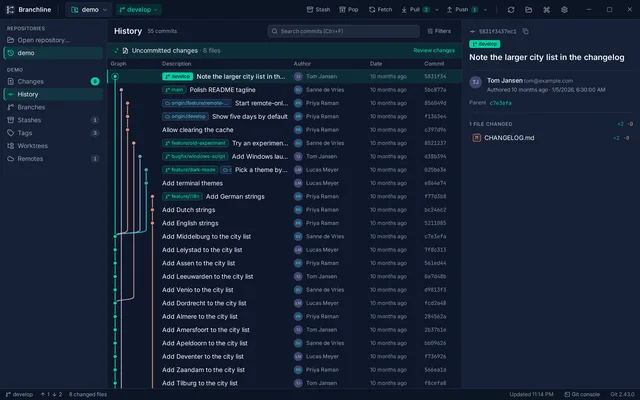
Ctrl+Shift+Enter) - History: the history of all branches with a commit graph, search by message, author or commit id, and columns and panels you can resize or hide in small windows
- Branches and remotes: create, switch, rename and delete branches, clean up branches that were merged and deleted on the remote, manage remotes from the Branches view, and fetch, pull and push with live progress and Cancel
- Rewrite history: clean up a branch before you share it: interactive rebase for just that branch’s own commits, with squashed commits grouped under the commit they go into
- Integrate: merge, rebase, cherry-pick and revert, a three-pane merge editor for conflicts, stashes, tags and worktrees
- Reviews: the merge requests waiting for you on GitLab, and pull requests on Bitbucket Cloud (beta), read right in Branchline with their discussion, commits and diffs
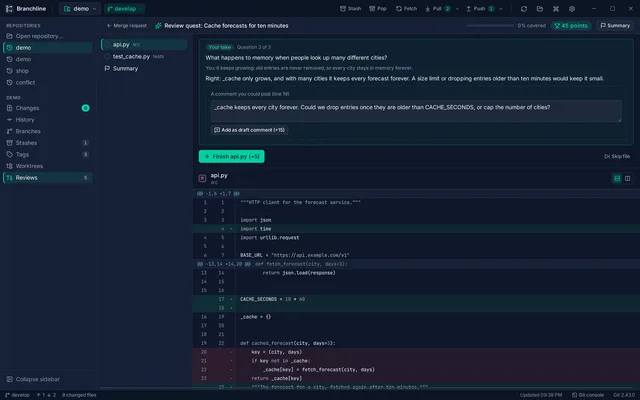
- Review quest: with AI turned on, an AI game master walks you through a merge request or your own branch, file by file, with questions, and turns what you find into draft review comments
- AI you choose: commit message suggestions, rebase suggestions and the review quest work with Ollama, any OpenAI-compatible server, Claude or GPT. With AI off, no AI feature appears anywhere.
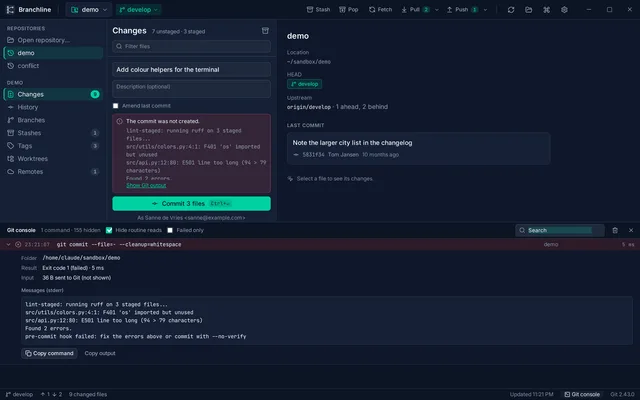
- Git console: every Git command and every request to GitLab or Bitbucket, with its output, so you can see what happened
- Command palette with every action, full keyboard control, and changes from your editor showing up within a second
Status
Branchline is released and moving fast. Version 0.1.0 came out on October 22, 2026. Since then 0.2 added the Git console and the About page, 0.2.5 brought Reviews for GitLab, Rewrite history and the choice of AI provider, and 0.3.0 (November 9, 2026) added the review quest, Bitbucket Cloud and Commit and push. Version 0.3.2 (November 13, 2026) makes the quest faster: the AI prepares the questions in the background while you play, and larger changes get more questions.
Next on the roadmap: posting your review comments from Branchline, review notes that remember what reviews in a project keep finding, and GitHub pull requests after that. The apps are not signed with Apple and Microsoft certificates yet; the website and the manual explain how to open them the first time.
Get it
Download Branchline from its website or the releases page, for Windows 10 and 11, macOS 11 or newer, and Linux. Branchline needs Git 2.20 or newer. It is open source under the MIT license.