What it is
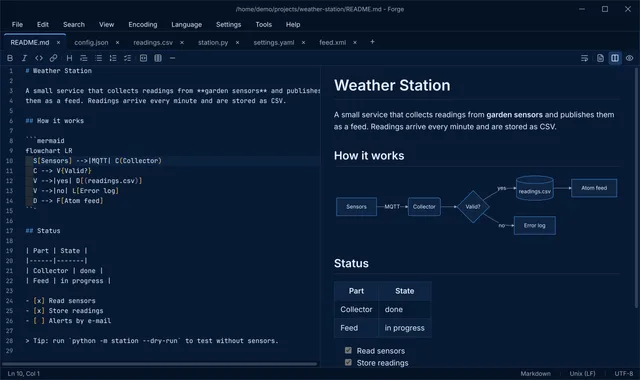
Forge is a fast, lightweight text editor for macOS, Linux and Windows. Open a file, get to work. Tools for JSON, CSV, Markdown, XML and YAML are built in, not bolted on. Forge has its own website at forge.bytefulminds.com, with a tour of its features and the downloads.
Why Forge
- Starts fast, stays fast. Large files load in the background, and above 20 MB the heavy features switch off so even huge logs scroll smoothly.
- Knows your files. Every document gets a toolbar with the tools for its language: formatting, validation, previews and conversions.
- A developer’s toolbox built in. Hashes, Base64 and URL encoding, letter case, UUIDs, timestamps and cron expressions, from the Tools menu or a right click.
- Looks the same everywhere. Forge draws its own window, menus and dialogs, in a dark and a light theme.
- Never loses work. Unsaved text and open tabs come back after a restart.
Highlights
- Markdown with a live preview, including tables, task lists, footnotes and Mermaid diagrams
- JSON formatting, validation as you type, and a tree view that selects the key in the code
- CSV with colored columns, a table view, delimiter and header detection, sorting, deduplication and export to JSON or Markdown
- Compare a document with its saved version or another tab
- Find in Files across a folder, with regular expressions and file filters
- Made for code: syntax highlighting for 23 languages, rainbow brackets, live syntax checks and the classic editor shortcuts your fingers already know
- English and Dutch interface
Get it
Version 0.2.0 (November 2, 2026) is the latest release, with downloads for macOS (Apple Silicon), Linux (AppImage) and Windows on its website and the releases page. From this version on, Forge keeps itself up to date: it checks once a day and installs a new version with one click. Coming from 0.1.0, download 0.2.0 once by hand. Forge is open source under the GNU GPLv3 license.