In WordPress, adding a booking system means installing a plugin and clicking “activate”. In Astro, there is no plugin. There is an empty file and a blinking cursor.
That was exactly what I wanted. It was also the hardest part of rebuilding our photography website. This is part 3 of the Dangtastic Shots story: building our own booking system.
What it needed to do
Visitors on our site can book two things:
- An introduction call, to get to know each other before a shoot.
- A mini shoot: a short themed session on a fixed date, with a few time slots.
Some mini shoots do not have a date yet. For those, visitors can ask to be notified, so we know who to contact once the date is set. And everyone who books gets a confirmation email, in the same style as the rest of our brand.
That last part was new for me. We never had styled confirmation emails before, and I had no experience with them.
The real puzzle: everything knows about everything
Building a form is easy. Making all the pieces aware of each other is not.
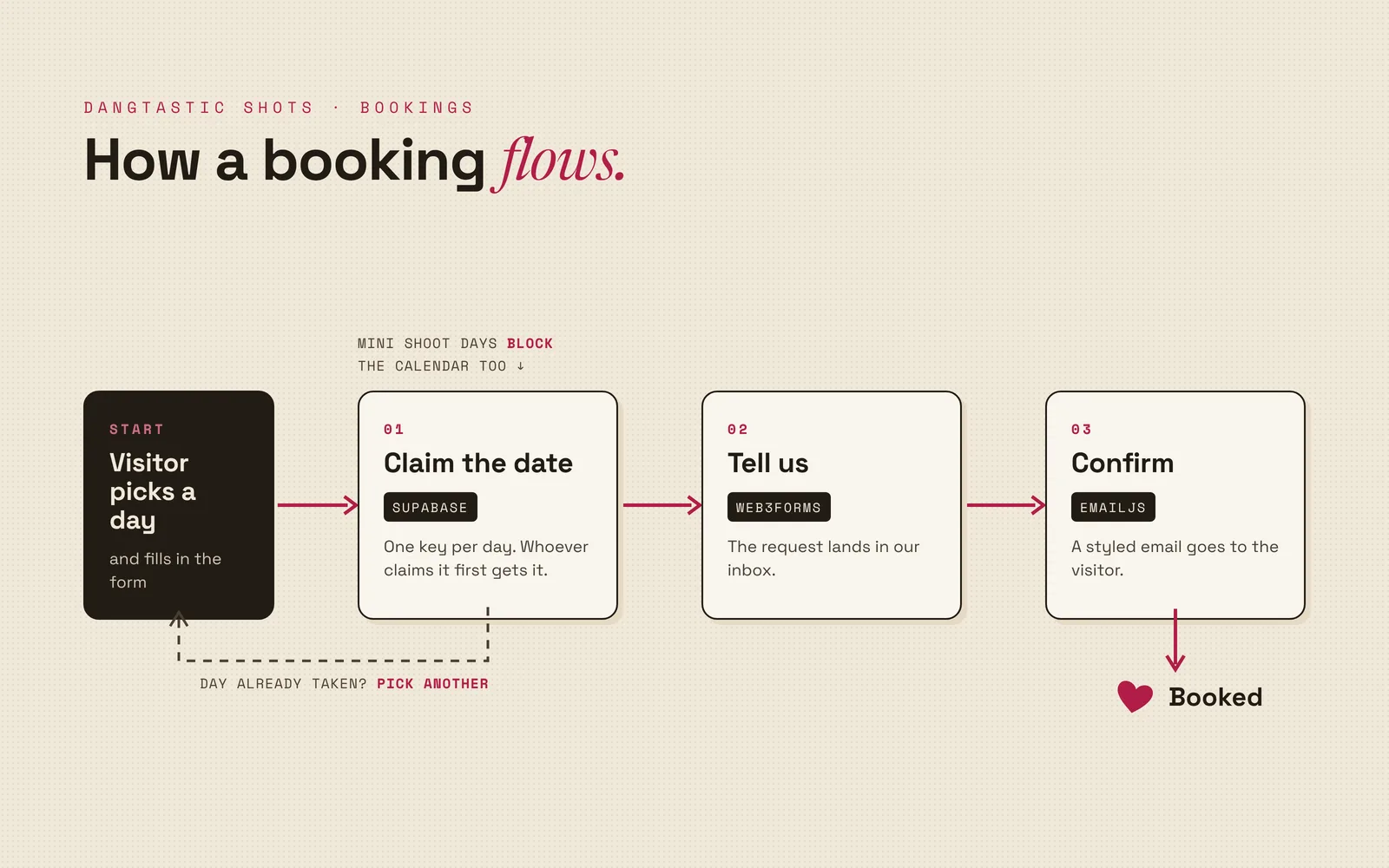
When we plan a mini shoot, that whole day is taken. Nobody should be able to book an introduction call on that same day. And two people should never be able to book an introduction call on the same day either, not even if they click “send” at the exact same second.
Was that needed for our launch? No. But it means one less thing to think about whenever we decide to do something else on a day.
The building blocks
Our site is static, so it has no server of its own to store bookings. For that I use Supabase: a hosted database with a ready-made way to talk to it straight from the browser. The bookings live in a few tables, which you can picture as spreadsheets with strict rules: the time slots of each mini shoot, the dates that are taken, the introduction call requests, and the list of people who want to be notified.
One key per day. The table with taken dates uses the date itself as its key, and a key can only exist once. So when two people try to claim the same day, the database accepts the first one and refuses the second. Think of a hotel with one key per room: whoever picks it up first has the room, no matter how fast the next guest runs to the desk.
One list of unavailable days. The calendar on the site needs to know which days are off limits: days with a mini shoot, and days that already have an introduction call. Instead of asking for both separately, the database combines them into one view, a sort of saved question that always returns the current answer. For the developers, this is the whole trick (slightly simplified):
create view kennismaking_unavailable_dates as
  select distinct event_date::text as block_date
  from minishoot_slots
  where event_date is not null
  union
  select block_date::text
  from kennismaking_blocked_dates;
The first half picks every day that has a mini shoot, the second half every day that has already been booked, and
union glues them into one list. Add a mini shoot, and that day disappears from the introduction call calendar on
its own.
Visitors can write, not read. Anyone can send a booking, but nobody can read the bookings of others from the browser. The database enforces that with row level security: rules per table about who may do what.
Sending the emails
When someone books an introduction call, three things happen in order:
- The date is claimed in the database. If someone else was just faster, the calendar updates and the visitor can pick another day.
- We get a message through Web3Forms, a service that forwards form submissions to our inbox.
- The visitor gets a confirmation through EmailJS, a service that sends emails from the browser using a template, in our own style.
If that last step fails, the booking is already saved. The visitor sees a message that their request was recorded and that we will contact them ourselves, so nobody is left wondering.
Tidying up after itself
A booking system collects personal data, so it should not keep it forever. The database cleans up after itself with scheduled jobs: introduction call requests older than two months are removed every month, and notification sign-ups are removed after nine months.
One small surprise: a free Supabase project pauses itself after a week without activity. So every visit to our homepage leaves a tiny ping in a separate table, and a nightly job sweeps those pings away again. The database stays awake, and the table never holds more than a day of pings.
Lessons
- No plugin means no shortcuts, and no surprises. Everything took longer to build, but nothing changes unless I change it.
- Let the database guard the rules. A date that can only exist once is safer than any check in the browser.
- Plan for the last step failing. Save the important part first, then tell the visitor honestly what happened.
What’s next
Next on my list: automatic quotes. Instead of calling us to ask what a boudoir session would cost, visitors fill in what they want and expect from a session and receive a quote right away. We will still want to meet everyone first, but it gives people a quick idea of the possibilities and the costs.